Blog/AI responder
How to Build an AI Responder for Cold Outbound
/Benyamin Holley/LinkedIn/Head of GTM
Outbound replies pile up. Most of them are simple. I wanted an agent that knows which campaign someone came from, has the real link or next step for that campaign, and only bothers a human when the reply is messy.
What problem this solves
You send a lot of outbound. People reply. Then the replies sit there. Someone eventually opens Lemlist or EmailBison and types the same answers again: here is the calendar link, here is the webinar link, no thanks, let me get back to you.
A lot of those replies are not hard. Someone says send me a calendar link. That should not need a human every time. You can put a confidence score on the intent. High confidence and a known next step for that campaign means the agent can draft the real link you already programmed in. Low confidence (an objection, a pricing question, something weird) means you ping the rep or post it in Slack.
The part that usually breaks is context. The agent has to know which campaign this person is on, and what that campaign is actually offering right now. Without that, it invents links and pitches.
Why one mega-prompt fails
I had wanted to build this for a while. What I realized is that different campaigns have different pitches and offers. You cannot just have a single reply agent universally programmed to react to every situation.
There are a lot of dead ends. If someone asks a technical question about your product, or pushes back on the offer, you cannot really hand that to an agent and trust it. I mean, maybe you could someday. I have not gotten there yet.
What I actually wanted was something simple. Say we are offering a webinar invite as the lead magnet. I want that link programmed into the agent through a UI. Then if somebody says hey, send me the link, it knows which link to send. It is not hallucinating a URL from training data.
So each campaign gets its own reply playbook: what you are offering, what the real links are, how to answer a yes versus a no versus a question versus a meeting ask. That is the context. The model stays small. The playbook holds the truth.
Fig. 01
Reply flow
A prospect reply is matched to a campaign playbook. High-confidence simple asks produce a draft with the programmed link. Low-confidence or ambiguous replies post to Slack for a rep. A human approves before send.
 Reply flow
Match the campaign playbook first. High-confidence simple asks become drafts with the programmed link. Messy replies go to Slack for a rep. Nothing sends until a human approves.
How to build it
Start with the playbook, not the model. For each campaign you write one record that holds the truth the model is allowed to use.
Offer: what this campaign is actually selling right now, in one plain sentence. Real links: calendar, webinar, waitlist, whatever people keep asking for. Branch rules for the common cases: they want the thing, they do not, they have a question, they want to meet. A hard list of things it must never invent (fake Calendly, fake Slack, a class that is not happening). Voice and sign-off so it sounds like you.
That is what the Playbooks screen is. Edit the offer, the if-yes / if-no / if-question / if-meeting rules, the never-list, and examples. When the webinar URL changes, you change it once here. You do not dig through a prompt string.
Then wire the resolver. A reply comes in from Lemlist or EmailBison with a campaign id. Load that playbook. Classify the reply into one of those branches. Draft a short response from the matching rule, using only the links and offer in the playbook. If confidence is high and the branch is simple, you have a draft ready for a human. If it is messy, post the inbound (and the draft, if you made one) to Slack and stop.
Do not auto-send on day one. The approve action is what sends. The agent is there so the boring replies are drafted in seconds with the right link, not so email goes out unsupervised at 2 a.m.
Fig. 02
Playbooks
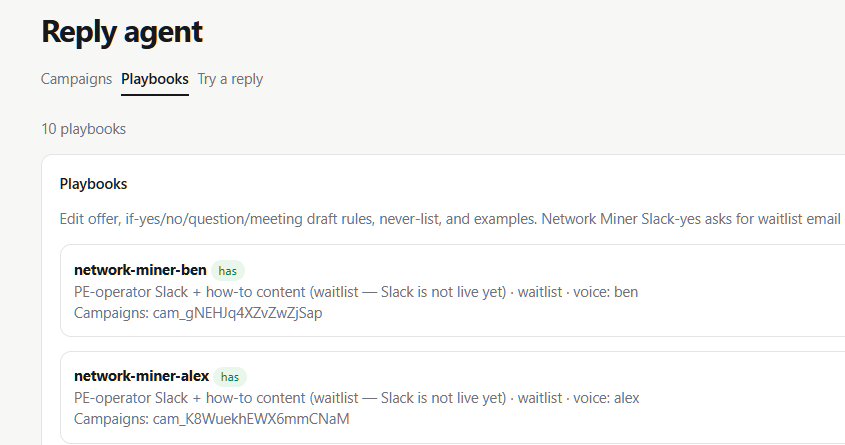
Each campaign gets its own playbook: offer, if-yes/no/question/meeting rules, never-list, and voice. This is where the truth lives.
A reply that comes in
Campaign is a webinar invite. The playbook has the real registration URL programmed in. Their reply is one line: "yeah send me the link."
Classifier says yes, high confidence. The draft rule for that branch is short: confirm, send the programmed webinar URL, ask one light next question, sign off like a person. The draft that comes back looks like this:
"Hey - here's the registration link: https://example.com/webinar-sept. Grab a seat and reply if you want me to hold one for you. - Ben"
That draft goes to Slack (or a queue) for a human tap. Nobody is inventing a URL. The link was already in the playbook.
Same campaign, different reply: "What's your pricing for the enterprise package?" Confidence drops. That is not a send-the-link case. The agent posts the inbound to Slack for the rep and does not pretend it knows the answer.
Try a reply is how you rehearse that path before you trust it on live threads. Pick the campaign, paste their reply, optionally paste the original outreach, hit generate. Same resolver as production. It does not touch campaign stats.
Fig. 03
Try a reply
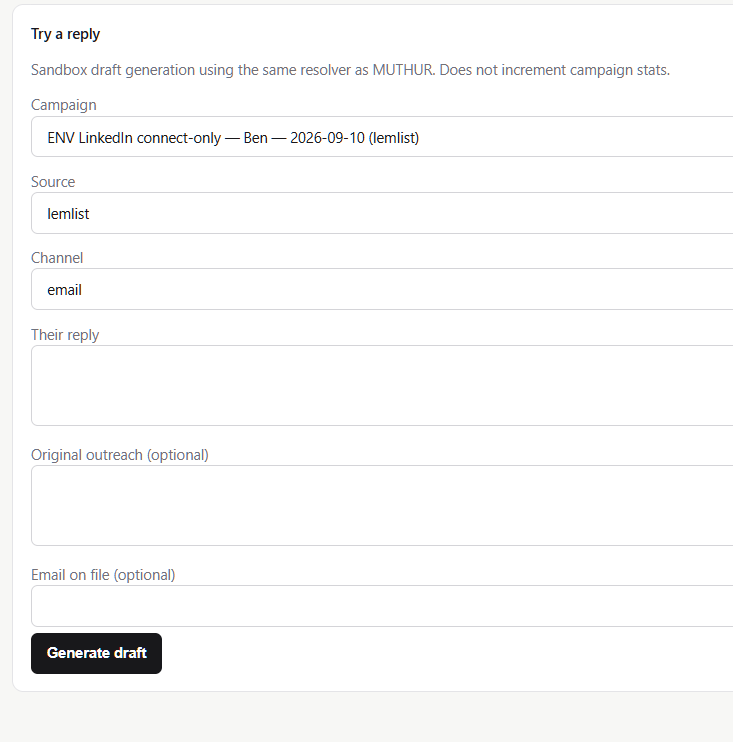
Sandbox the same resolver against a real campaign playbook. Paste their reply, optionally the original outreach, generate a draft without touching stats.
Controls that matter in practice
You need an off switch. Global off until the playbooks are tested. Per-campaign off when you kill an offer but old threads still trickle in.
You need the right links editable in a UI, not buried in a prompt string somebody forgot to update.
And you need a confidence gate. Simple, high-confidence asks can move fast. Everything else should bother a person.
What the prompt actually builds
The download is a one-shot agent prompt. Drop it into Cursor, Claude Code, or Codex against an empty folder. It asks you the operator questions first (offer, campaigns, real booking link or none, voice, never-list, where drafts land, kill switches, stack), then builds the shape:
A ReplyPlaybook schema per campaign. Inbound webhook or poll from your sender. Intent classification into yes / no / question / meeting. Drafting from the matching branch with the programmed links. An approval surface (Slack is the usual path) so nothing sends until a human says so.
It is drafts only. Not a full outbound sequencer. Not list buying. Not auto-send. You still bring your own Lemlist or EmailBison and your own Slack.
The useful part is the pattern: campaign context, programmed links, confidence, human review when it is ambiguous. You do not need our exact stack.
If these sorts of custom-built systems are things your business is interested in, reach out to us at Apero. Email ben@aperoadvisors.com or fill out the information below. You can add me on LinkedIn.
Questions
What is an AI responder for cold outbound?
It is an agent that knows which outbound campaign a reply came from, has the real links and next steps for that campaign, drafts a short response for common cases, and escalates ambiguous replies to a human (usually Slack).
Does it auto-send everything?
No. Every draft goes through human approval before anything sends. High-confidence simple asks still produce a draft with the right programmed link; ambiguous or high-stakes replies go to Slack for a rep. Send only happens when someone approves.
Why not one big prompt for all campaigns?
Different campaigns sell different things. A single prompt invents the wrong link or the wrong pitch. A playbook per campaign holds the offer and the real URLs so the model cannot hallucinate them.
When should it bother a human?
When confidence is low: objections, pricing debates, technical product questions, anything that is not a clear yes/no/send-the-link. Post in Slack or assign to the rep.
