Blog/Agent context
GitHub as the marketing context layer
/Benyamin Holley/LinkedIn/Head of GTM
Logos and hex codes are the easy part. The hard part is how you write about and position the product. Put that in a GitHub repo, tell the agent what to load for which job, and have someone own the updates.
I heard a talk by a marketing leader at an event in New York. Part of it was about a new growth hire who'd sent out a batch of product marketing emails that didn't follow the brand guidelines. He was new, the team was moving fast, and it showed.
My first thought was that you can put brand guidelines into Claude. Pixel sizes, fonts, colors, hex codes, all of it. She'd already done that. The logos and the colors were fine. What was missing was how they write about the product and how they position it, and that's a lot harder to paste into a chat window.
After the show I went up to her and said, "Hey, have you ever tried using GitHub for context?" People call this context repos, context management, or the context layer now. I just said GitHub for context.
Why GitHub and not a folder of docs
Most teams start with a bunch of random-ass markdown files. Someone drops a brand PDF, a messaging doc, and three old playbooks into a Claude project and hopes the model sorts it out.
That works for about a month. Then a PMM updates the mid-market value prop in a Google Doc, and the Claude project is still running last quarter's version. A new hire keeps their own notes in a personal project and never tells anyone. When two files disagree, the agent picks one. Sometimes it blends them, which is worse.
GitHub fixes the boring problems. There's one copy. Every change has a name, a date, and a reason attached to it. You can roll back. And it's just way easier to structure things for agents in a repo than in a pile of uploads.
One big file vs. a context layer
This is the part that took me a while to explain, so bear with me.
The difference between one markdown file and what I built in my own Claude Code setup is that the context is split up, and the agent gets told when to load each piece. When I set it up, that did two things. It saved tokens, and it worked around the fact that LLMs aren't great at figuring out what's actually important when you hand them everything at once.
A year ago, the advice I kept hearing was to keep your CLAUDE.md under 500 lines or you'd get context bloat. Anthropic's current docs are actually stricter. They say aim for under 200 lines, and 500 is the cap they give for a single skill. Mine is 216. I'm working on it.
I'm not sure today's models have those problems as badly as they used to. I've just always found it to be a best practice when building context layers. Anthropic still writes about context rot, where recall gets worse as the context window fills up, so it's still worth keeping any context you have, anywhere, short and limited to what's necessary. LLMs are really bad at telling what actually matters. Don't make them guess.
Referential memory
I call this referential memory. I'm pretty sure I made that up. Anthropic calls it progressive disclosure, which sounds like something your doctor would mention, but it's the same idea.
When you're making an omelet, you need eggs, butter, and a pan. You don't need the leftover takeout or a log of everything that's been in your fridge since 2023.
Agents should work the same way. For each task, the agent looks at what's available and pulls only what that task needs. In Claude Code that happens two ways:
The routing file. `CLAUDE.md` (or `AGENTS.md`) loads at the start of every session. That's why it has to stay short. Its job is to say which files go with which job.
Skills. Every session, Claude sees each skill's name and its one-line description. The full skill only loads when the task matches. So the description is where you write "use this when."
Here's a sanitized description from one of my agent skills. It tells every agent when to load my voice and format rules:
Use this before writing anything for the company (emails, cold email,
Slack, LinkedIn DMs, decks, one-pagers) so every agent follows the
same voice and format rules.
The agent doesn't have to guess whether the style guide applies. The description tells it.
What's actually in my setup
Quick note before the tree. These days I'm not doing much in Claude. I work across Grok Bot, Cursor, and Codex. The file names change a little between them, but the context engineering principles apply anywhere: keep the always-on file short, split the rest up, and tell the agent when to load what.
My Claude Code setup lives in a private GitHub repo. It's a little older than skills, so the on-demand parts are slash commands and a lookup table instead. Here's the structure, minus anything with a key or a client name in it:
.claude/
  CLAUDE.md        # ~200 lines: behavior rules, plus "when to load what" tables
  commands/        # slash commands: /company-enrichment, /followup, /sf-discovery
  api-docs/        # one reference doc per tool (Salesforce, LeadMagic, Exa, Cloudflare)
  api-scripts/     # reusable Python for common API calls, plus a catalog
  references/      # ICP, personas, outreach guide, copywriting rules, spam words
  case-studies/    # proof I'm allowed to cite
  hooks/           # e.g. Claude has to ask before it edits its own memory
  *-schema.md      # CRM and sequencer schemas
`CLAUDE.md` has a table with three columns: the context, when to load it, and where it lives. One row says that for any cold email, LinkedIn DM, or campaign copy, read the ICP, the personas, and the outreach guide. Another says to read a tool's API doc before writing any call to it. The API docs are self-healing, sort of. When a call fails because a field name is wrong, the rule is to fix the task and the doc, so the next session doesn't make the same mistake.
If you're X, you could have Y
What goes in the repo depends on who you are.
If you're doing GTM engineering or RevOps, most of it is like mine: cold email, moving data from one system to another, and targeting and messaging. API docs, CRM schemas, enrichment scripts, an ICP, and copy rules for outbound.
If you're a marketing leader, you'd lean on brand and design skills and design context. Our website is a good example. The Apero site repo has a `DESIGN.md` with the color tokens, type scale, spacing, and a list of things the site should never do (no purple SaaS gradients, ever), plus always-on Cursor rules that tell the agent to read it before touching any UI. So when an agent is reading and building in that repo, it knows what the site should look like without anyone pasting in a brand PDF.
If you're in product marketing, your big use case is lifecycle emails segmented by persona, where each persona gets different value props. That's what the value props folder is for. Inside it you'd have personas, verticals, company sizes, industries, whatever you segment by. When someone uses Claude Code to write a lifecycle email in that repo, it pulls the version that's already been vetted.
If you run sales, you'd keep objection handling, approved proof, and one-pager templates in there so reps stop inventing case studies on discovery calls.
What a marketing context repo looks like
Here's an example structure for a marketing team. It's a template, not a copy of ours:
marketing-context/
  CLAUDE.md                 # one line: @AGENTS.md
  AGENTS.md                 # the routing file, short
  .claude/
    skills/
      style-guide/
        SKILL.md
      pre-send-copy-review/
        SKILL.md
  brand/
    voice.md
    visual.md
  messaging/
    value-props/
      personas/
      verticals/
      company-sizes/
    proof.md
  targeting/
    icp.md
  playbooks/
    lifecycle-emails.md
    linkedin.md
    one-pagers.md
    launches.md
The routing file does the heavy lifting. It might say: for lifecycle emails, use the style guide, the matching persona and value prop, and the lifecycle playbook, run the pre-send review, and don't make up a value prop that isn't in the repo.
Two small details matter here. Skills only get picked up automatically from the right folder: `.claude/skills/` for Claude Code, `.agents/skills/` for Codex and Cursor (Cursor reads `.claude/skills/` too). And if you keep `AGENTS.md` as the main file so Cursor and Codex can read it too, put `@AGENTS.md` in your `CLAUDE.md`. That actually imports it. Writing "go read AGENTS.md" in plain English only works if Claude decides to.
What to load, and when
Here's the omelet idea as a map. Four marketing tasks, the folders each one pulls, and the folders it leaves in the fridge.
Fig. 01
What the agent pulls, and what it leaves in the fridge
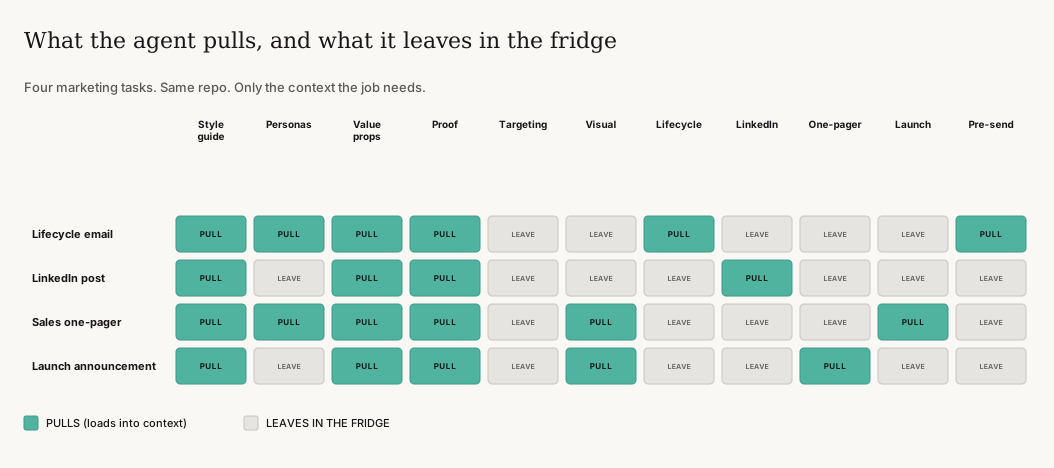
Four marketing tasks. Same repo. Only the context the job needs.
The style guide and value props show up almost every time. Targeting stays out of a LinkedIn post. A launch announcement has no business loading the lifecycle email playbook. The agent can see the whole fridge. It just doesn't have to eat everything in it.
How it gets to the whole team
My pitch to that marketing leader was that she could use the repo as a centrally controlled, version-controlled place to update messaging, and it would feed straight into everyone's agents.
That's true, with one catch. Agents only pick it up when they're working in that repo, or in a project that pulls it in (a clone, a git submodule, a plugin, or a GitHub connector). It doesn't beam itself onto everyone's laptop. In practice that means people pull before they write, or you have the agent pull for them. Once that habit is there, a change the owner approves on Monday is in everybody's emails by Tuesday. Including the guy who started last week.
Drift
Now, if you just treat this the same way marketing updates already get treated (which is that nobody's paying attention to them and everybody forgets they need to be updating their positioning), then yes, this isn't really doing anything but instantiating old context into a system that's feeding all of your production.
That's why I recommend an agent go through the places where messaging actually changes. Slack, Google Docs, the website, call recordings, whatever your team works in. It compares what it finds against the repo, and if the mid-market value prop moved or the way people describe the product in Slack has moved on, it opens a pull request with the update and a link to where it found it.
I'd set that agent up in Grok Bot hooked up to the repo, since Grok Bot can have all the integrations you need. You could probably also set it up as a scheduled job in Claude or Codex. Either way, it proposes and a person approves.
Who approves the messaging
If you want to run marketing like a software team, give the pod or department lead merge rights. Nothing lands in the repo until that person accepts it, and you get a changelog for free.
If your team hears "merge rights" and quietly closes the tab, there's a lighter version. One person owns the messaging. Proposed updates, including the ones from the drift agent, get reviewed before they become the source of truth. That review can be a pull request, a Slack thread, or a quick weekly pass. What matters is that agents only read what the owner signed off on.
How to start
You don't have to move your whole company into a repo on day one.
1. Create a private GitHub repo. Call it `marketing-context` or something equally exciting.
2. Move in the files you already trust: voice, visual tokens, personas, value props, and the proof you'd want an agent to use. Add a style guide skill in `.claude/skills/` (or `.agents/skills/` for Codex and Cursor) with a "use this when" description.
3. Write a short `AGENTS.md` that routes the one or two jobs you care about most, and a `CLAUDE.md` that imports it. Lifecycle emails by persona are a good first pick because the segmentation rules are clear.
4. Open the repo in Claude Code and run a real task. Check what it loaded. If it grabbed the wrong file, fix the routing file or the skill description. Don't patch the prompt.
5. Decide who approves changes, and how everyone else gets the latest version.
Skip migrating every doc anyone's ever written. Start with the context that would've stopped those off-brand emails.
Grab the setup prompt
We wrote a prompt that does the first pass for you. Paste it into Claude Code, or whatever agent you use, in an empty repo. It'll interview you first about who you are and what you want the repo for, how big your team is, and who approves messaging. Then it scaffolds the repo: routing file, skills, brand, messaging, and playbooks, sized to your team.
We're Apero Advisors, a GTM implementation shop for PE and VC-backed companies. If you want help building this for your team, fill out the contact form.
